An agent writes a JSON file into storage you already own. There is no API, no upload and no notification. The app derives the path, reads it, and shows it.
A draft is a JSON object. schema must be 3: a draft written to a later version is refused rather than half understood.
| Field | Required | Meaning |
|---|---|---|
| schema | yes | Must be 3. |
| owner, repo, number | yes | Identify the pull request. They must agree with the filename. |
| title, url | no | Shown in the header. |
| reviewedAt | no | The commit the review was written against. Shown so a stale draft is visible as stale, and sent as the review's commit id. |
| draftedAt | no | ISO 8601 timestamp of the most recent write, including an in-progress one. |
| finishedAt | no | ISO 8601 timestamp set only on the write that finishes the review. Absent while still in progress. |
| progress | no | Where an unfinished review has got to: a note, a percent, both optional. Ignored once finishedAt is set. |
| verdict | yes | APPROVE, COMMENT or REQUEST_CHANGES, used verbatim as the GitHub review event. |
| summary | no | One line of plain text. What the reviewer would say in a sentence. Not posted. |
| sections | no | How the review is organised. Shown in the verdict pane and used as its filters. Not posted. |
| findings | no | The individual comments, each anchored to a file and line. Posted as inline review comments, minus any the reader drops. |
| qa | no | Evidence from actually running the change. Not posted. |
| comment | no | Markdown, posted as the review's body. Empty is legitimate: the findings can be the whole review. |
A section carries a key, and optionally a label, a color, a count and a body. Sections are whatever the agent decides they are: the app renders what it is handed, in the order given, and offers each as a filter.
color is a named token rather than a value, one of neutral, ok, warn, critical, accent. The app maps each name onto its own palette, so a draft reads correctly in both themes and no agent can produce an unreadable pane. An unrecognised name falls back to neutral rather than failing the draft. The glyph beside a section derives from its colour rather than being chosen, so nothing can pair a green tick with a critical finding.
A finding needs an id, a path, a line and a body. It may carry a section, a free-text kind badge, a color, a blocking flag, and a suggestion that GitHub renders with an Apply button. Ordering is the agent's, in the file and in the posted review.
blocking is not posted. It shapes what the footer says before the reader sends the review.
qa holds a note and a list of scenarios. Each scenario carries an id, and optionally the url it drove, one line on what it proves, a verdict of pass, fail or skip, a video, a frames count and a durationMs. None of it is posted. A failing scenario is evidence rather than an error, and is shown first.
video is relative to the drafts directory and must stay inside it. An absolute path, or one climbing out, is refused.
Three fields on a finding, dropped, drafted and posted, and the top-level postedAt and postedUrl, belong to the reader rather than the agent. An agent writing a draft leaves all of them out, and the app does not write them either. They are still read, so a draft written by an older version is understood rather than refused.
A draft source is a name and a piece of storage you already own. Drafts sit under drafts/ at its root, one directory per pull request, with any media beside the draft.
<draft source>/drafts/<owner>--<repo>-<number>/review.json
So org/app#36277 is drafts/org--app-36277/review.json. The path is derived, never discovered. The app asks GitHub which pull requests await your review and requests the file for each. A missing file means nothing has been drafted yet.
One other thing lives in that storage, and it is the app's rather than the agent's.
<draft source>/.reviewer/events/<device>.jsonl
That is the reader's own append-only log: what they dropped, edited, posted and dismissed, one file per device, so no two browsers write the same file. The app never writes to a draft, so the agent and the app can never race for the same bytes, and an agent is free to rewrite its draft while you are part way through reading it.
Switching source changes the queue and its drafts together, so two sources watching different organisations cannot collide.
Most readers do not need to. app.dev.review is the same build, already running, and it holds nothing of yours: no server behind it keeps a database, a credential, or a copy of your files - it just serves the interface, which reads your storage directly from your own browser.
There is also a desktop build, signed and notarised, for readers who want it as its own app rather than a tab.
Running it yourself is a static site with nothing to install first - no lockfile, no node_modules, no build step - so web/ serves with anything, or the small Go server already in the repository:
cd serve
go run . -dir ../web
Pick the storage your drafts will live in - a folder on this computer, iCloud Drive on iOS, a GitHub repository, any git remote you already push to, or an S3-compatible bucket. Each of those pages carries the exact fields, tokens and CORS rules that one needs; a folder handle is remembered between sessions, and a bucket needs CORS.
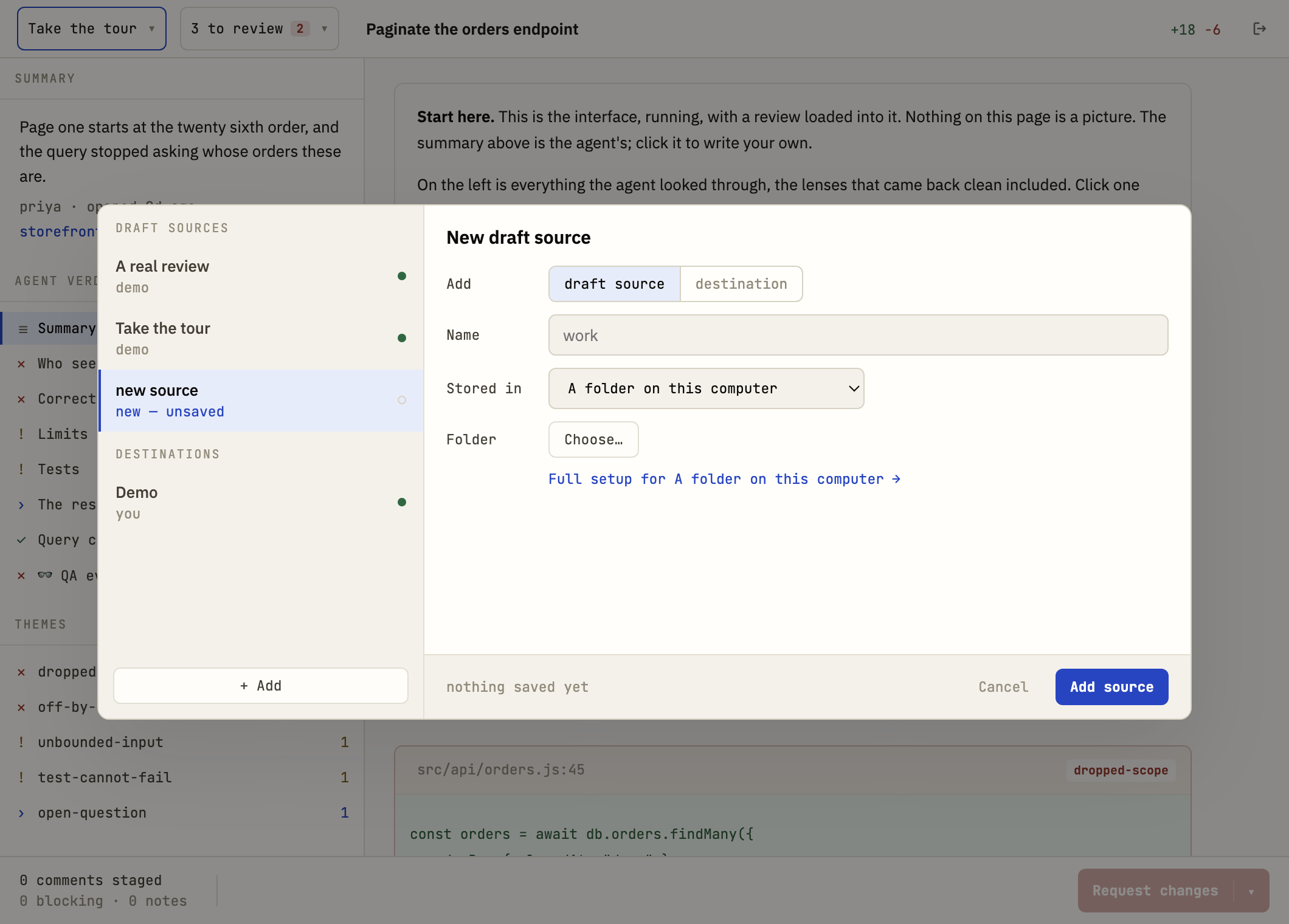
Whichever one is chosen, that link under the picker goes straight to its page - the form only asks what to type into a box, not the CORS rule or the token scope a reader would otherwise have to go looking for.
Git earns an extra sentence here in both directions. A write is a commit, so the history is the audit trail and a draft that changed can be traced to the run that changed it. In a browser it needs a CORS proxy you name, because no git host answers a tab directly, and the header carrying your token passes through whoever runs that proxy. The desktop build drives the git already on your machine, with your own credential helper, and needs no proxy at all.
Fine-grained is preferable, scoped to the repositories you review: Pull requests read and write, Metadata read. That is the entire surface the app needs.
Some organisations require an owner to approve fine-grained tokens on their repositories. If yours does, a classic token with the single repo scope works, but understand that repo grants read and write to every repository you can reach. There is no narrower classic scope that can post a review. Set an expiry either way.
The token never leaves your browser. api.github.com permits cross-origin requests with an Authorization header, so nothing proxies and no credential exists anywhere but the machine you are sitting at. It is also kept out of the event log on purpose: the log is the thing that syncs into your storage, and a credential that syncs is a credential that has left the browser it was typed into.
Point an agent at the source and have it write review.json for a pull request that is waiting on you. Then reload, and the review is there.
An adapter is a reader: the place drafts are read from, and the place the event log is synced to. It is always storage the customer already owns. The surface is deliberately small, because anything larger and adding a backend stops being an afternoon's work.
A subclass implements five: list a prefix, read a path, write bytes to a path, remove a path, and media for the recordings a draft points at. The base class provides watch, which notices changes under a prefix, and poll, which runs one round of every watch. Watching is polling for every backend shipped today, which at one draft an hour is the right amount of machinery.
config returns enough to rebuild the adapter, for persisting. Credentials are never in it.
Paths are relative and forward-slashed, inside the adapter's root. Containment is checked in the adapter as well as in the draft parser, because draft-supplied strings reach it and the cost of being wrong once is reading a file off someone's disk.
Every source backend is run through one shared conformance suite. A backend either behaves like the others or fails out loud, which is what keeps adding a third one small.
A destination is the other half, and it is a separate choice. Today that is GitHub. Adding GitLab is adding a file in web/src/destinations/.